Navigate IVR
Autonomous Navigation for Complex IVR Systems
Equip your AI agents to handle multi-level phone menus, enter extensions, and route calls with human-like precision using full DTMF support.
What is AI IVR navigation?
AI IVR navigation is a voice agent working through another organisation’s automated phone system on your behalf — listening to menu prompts, pressing the right keys, entering account numbers, and reaching the correct department without a person sitting on hold.
The capability matters for outbound calling into large organisations. Verifying coverage with an insurer, chasing an order with a supplier, or reaching a specific department at a utility all begin with several minutes of menu navigation before any conversation starts. That time is pure overhead, and it is the part staff most dislike.
Aimna handles this with full DTMF support, sending touch-tone signals exactly as a human pressing keys would, including digits, star, and pound. Agents can work in two modes: replaying a predefined sequence for a phone tree you already know, or listening to the spoken options and deciding which to select based on the goal of the call. The listening mode is what keeps navigation working when a company reorders its menu, since nothing is hard-coded to a fixed path.
Navigation also extends to the data those systems demand before connecting you — account numbers, reference codes, PINs, and date-of-birth digits can all be entered mid-call. The agent moves through nested menus one level at a time and only begins the real conversation once it has reached the right human or department.
Capabilities
Intelligent IVR Navigation Capabilities
Automated Tree Traversal
Full DTMF Control
Context-Aware Routing
Use Cases
When Your AI Agent Needs to Navigate IVR
B2B Sales — Supplier Communication
Agents contacting suppliers for order updates and inventory checks automatically route through IVR systems to reach specific departments.
Healthcare — Prescription Verification
Pharmacy verification calls require navigating IVR menus to reach the appropriate department for prescription requests and refill confirmations.
Financial — Request for Quotation
AI agents following up on quotations or delivery timelines automatically route to the correct departments through IVR trees.
How it works
How It Works

Activate IVR Capabilities
Enable the Navigate IVR function within your agent settings. This unlocks the ability for the AI to interact with phone menu systems using touch-tone signals.
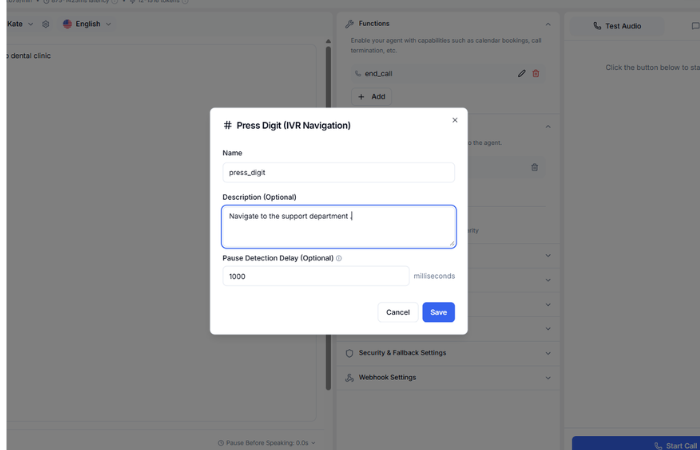
Configure Navigation Logic
Define the specific decision rules for your target phone systems. You can tell the agent exactly which digits to press for different departments or based on the options it hears.
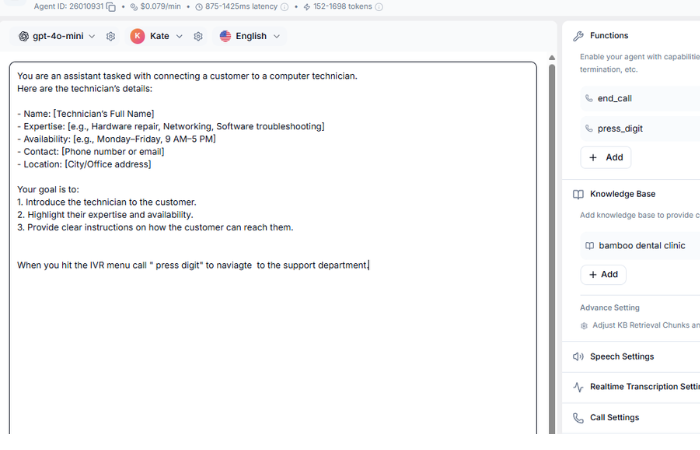
Guide with Agent Prompts
Finalize the setup by adding clear navigation instructions to your agent prompts. This ensures the AI knows the exact sequence required to successfully traverse complex menu paths.
FAQ
Questions & Answers
Yes. The AI listens to actual IVR prompts in real-time and adapts its key presses accordingly, even when menu options change between calls.
It works with any standard DTMF-based IVR system. The AI sends touch-tone signals exactly like a human pressing keys on a phone keypad.
Yes. You can configure the AI to enter specific digit sequences like account numbers, PINs, or verification codes during IVR navigation.
You can either pre-define the key sequences for known IVR trees, or let the AI listen to the spoken menu options and make intelligent decisions based on the conversation context.
Because the agent listens to the spoken options rather than replaying a fixed script, a reordered or reworded menu is handled on the next call without you editing anything. Hard-coded sequences break when menus change; listening does not.
Yes. The agent works through nested menus one level at a time, responding to each prompt as it hears it, so multi-level trees that end in a department or extension are handled end to end.
The agent responds by voice when a system uses speech recognition, and by DTMF tones when it expects key presses — including systems that mix both across different levels.
It is mainly an outbound capability: your agent calls another organisation — a supplier, insurer, or partner — and works through their phone system to reach the right department without a human waiting on hold.
Ready to Get Started?
Start with $5 free credits. No credit card required. Deploy your first AI voice agent in minutes.