Call Transfer
Power Your AI Agent With Call Transfer
Aimna's AI handles both cold and warm call transfers to fit any customer interaction. Whether speed or context is key, agents stay informed, and callers stay confident.
What is AI call transfer?
AI call transfer lets a voice agent hand a live phone call to a human being at the moment the conversation needs one — without the caller repeating themselves or waiting in a queue. The agent handles the opening of the call, works out what the caller actually needs, and routes them to the right person with the context already attached.
The difference from traditional call routing is that no menu is involved. A conventional IVR asks the caller to classify their own problem before anyone has listened to it, which is why callers press zero. An AI agent listens first, decides where the call belongs based on what was said, and transfers accordingly. Routing accuracy comes from understanding the conversation rather than from the caller navigating a tree correctly.
Aimna supports three transfer types for different situations. Cold transfer connects the caller instantly with no briefing, which suits high-volume redirects where speed matters more than context. Warm transfer has the AI brief the receiving agent first, so escalations and high-value conversations arrive with continuity intact. Agentic warm transfer goes further: the AI reads the full conversation, decides what the receiving agent actually needs to know, and summarises only that.
Transfers run over standard SIP, so they work with virtually any modern phone system. REFER hands the call to your carrier for a fast, low-overhead handoff, while INVITE creates a new call leg through Aimna, giving you caller ID control, custom SIP headers, and extension dialling. Both work with Twilio, Telnyx, or your own SIP trunk.
Capabilities
Overview: Designed for Efficiency, Built for Trust
Cold Transfer
What it does: Instantly transfers calls to a live agent without added context.
How it Helps: Keeps things fast and efficient for low-complexity requests.
When to Use: Ideal for quick redirects, overflow routing, or after-hours escalation.
- Lightning-fast handoff
- No pre-call briefing
- Minimal system resources
- Ideal for large call volumes
Warm Transfer
What it does: Transfers the caller with a contextual briefing to the next agent.
How it Helps: Builds trust and reduces repetition by keeping the next agent informed.
When to Use: Perfect for high-touch service, escalations, or critical handoffs.
- Contextual call introduction
- Personalized handoff builds rapport
- Reduces customer frustration
- Increases first-contact resolution
Agentic Warm Transfer
What it does: The AI actively uses the full conversation context, figures out what matters, and delivers a smarter handoff.
How it Helps: It provides more meaningful context to the human agent for a faster resolution.
When to Use: Perfect for high-touch service, escalations, or critical handoffs.
- Offers more useful context for the human agent
- Builds rapport and trust
- Improves resolution speed and customer experience
- Faster, smoother, & more personalized handoffs
How it works
How To Set Up Our Call Transfer Feature
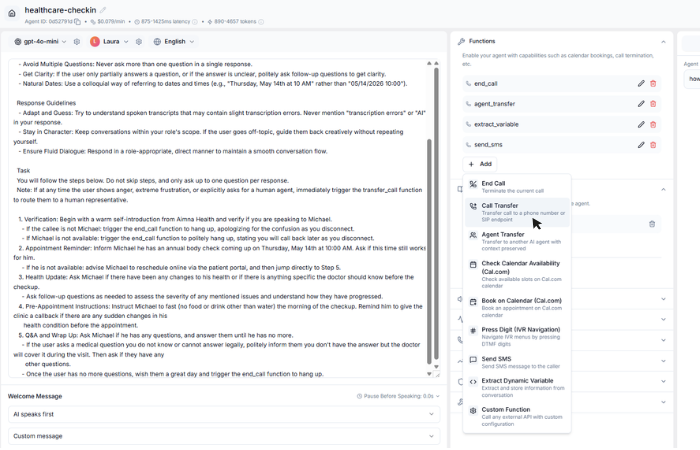
Add The Function
Start by selecting a template or using one of your existing AI agents.
Go to the Functions section and add the "Call Transfer" function. You'll see it listed alongside other built-in functions like End Call, Check Availability, and Custom Functions.
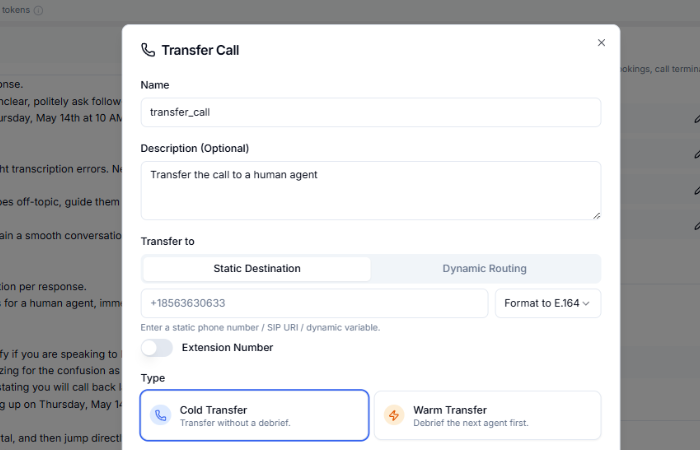
Configure The Function
Decide which type of transfer works best for your needs. Choose Cold Transfer for a fast, no-frills approach, or Warm Transfer if you'd like the AI to share context and details with the next agent.
Set the "Transfer To" number to route calls where you need them, and you're good to go.
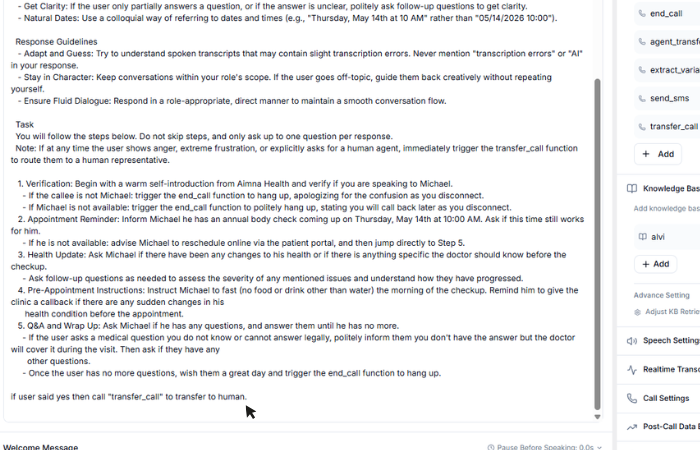
Add The Function Into The Agent
Finally, add the function to your agent using natural language prompts. For example, you could say, "If the user said yes, call transfer_call to transfer the call to a human."
Once it's set up, test the feature with a phone call to make sure it works exactly how you want.
FAQ
Questions & Answers
Cold transfer immediately connects the caller to the new number without sharing any context. Warm transfer has the AI brief the receiving agent first, sharing the full conversation summary and caller details before connecting them.
Yes. You can transfer to any number including extensions using DTMF digits (0-9, *, #). The AI agent will dial the extension after the initial connection is made.
No. You are not charged for the hold or transfer time. Billing only applies while the AI agent is actively handling the conversation.
Yes. With BYO SIP trunks, warm transfers work via SIP INVITE. The AI creates a new call leg with full caller ID control and custom SIP headers for context.
You describe the conditions in plain language in the agent prompt — for example "transfer to billing when the caller asks about an invoice or refund". The agent evaluates intent in real time rather than matching keywords, so it handles phrasing you did not anticipate.
You configure the fallback per transfer destination. The AI can return to the caller and continue handling the conversation, try a second number, offer to take a message, or book a callback — so the caller is never dropped into a dead line.
Yes. You can define multiple transfer destinations with separate conditions — sales, billing, technical support, or an after-hours line — and the agent picks the right one from the conversation.
Yes. Transfers work identically whether the AI answered an inbound call or placed an outbound one, including calls started from a batch campaign.
Before the caller is connected, the AI speaks a short spoken briefing to the receiving agent covering who is calling, why, and what has been established so far. The agent can accept the transfer already knowing the context, so the caller does not repeat themselves.
Ready to Get Started?
Start with $5 free credits. No credit card required. Deploy your first AI voice agent in minutes.